How to Fill Out and File Modelo 347
Modelo 347 — DECLARACIÓN ANUAL DE OPERACIONES CON TERCERAS PERSONAS

Agencia Tributaria (AEAT) provides a detailed set of official instructions that explains what each field means and how to file the form online , but it often doesn’t give you the “full picture” of how to complete the return end-to-end.
In this guide, we’ll walk through how to fill out and file Modelo 347 using real-world invoice (factura) examples for both income and expenses.
What Modelo 347 is for
Modelo 347 is an annual informative tax return where you report transactions with clients and suppliers when the yearly total with a given counterparty exceeds €3,005.06 (VAT included). In practice, it’s a summary of your most significant business relationships. AEAT uses it to cross-check data reported by both sides and verify that your tax reporting is consistent.
This is an information return — it doesn’t directly generate tax due or a refund. However, completing it correctly matters to avoid penalties and issues during an audit or verification.
Who must file Modelo 347?
There are multiple categories listed in the rules, but for self-employed taxpayers the first one is the relevant one:
Those who carry out a business or professional activity (actividades empresariales o profesionales) must report all individuals and legal entities they transacted with, when the total amount of transactions with each such person or entity during the calendar year exceeds €3,005.06.
The €3,005.06 threshold includes VAT (IVA)
Other categories include:
- Entities subject to the horizontal property regime (comunidades de propietarios)
- Private social welfare institutions
- Companies, associations, professional bodies
- Public bodies, unions, etc.
Exemptions
- Anyone who didn’t have transactions with any single counterparty exceeding €3,005.06 during the calendar year.
- Taxpayers who do not have their main place of business in Spain, a permanent establishment (establecimiento permanente), or a tax domicile (domicilio fiscal) in Spain; and, for entities under the atribución de rentas regime formed abroad, those without presence in Spain
- Taxpayers covered by SII (Suministro Inmediato de Información)
Transactions excluded from Modelo 347
- Transactions that are already reported periodically through specific returns: Modelo 111, Modelo 115, Modelo 180, Modelo 190, Modelo 349.
- Transactions for which there is no obligation to issue an invoice (factura), except for insurance transactions (operaciones de seguro).
- Imports and exports of goods (importaciones y exportaciones de mercancías), since Customs already has this information
- Transactions outside your business/professional activity (personal spending)
- Free-of-charge transactions (a título gratuito) that are non-taxable or VAT-exempt
- Shipments between mainland Spain / the Balearic Islands and the Canary Islands, Ceuta, and Melilla
Imports/exports of services with third countries (outside the EU) must be reported, because this information is typically not reported anywhere else.
Filing deadline
Modelo 347 is filed from February 1 through February 28, 2026
How to decide what to report in Modelo 347
To determine whether you need to report a counterparty in Modelo 347, use this checklist:
- Calculate your total purchases and sales with each counterparty for the year, including VAT (IVA)
- Exclude transactions with other EU countries (they are reported in Modelo 349)
- Exclude transactions with Spanish companies that include withholding (retenciones IRPF) — these are reported in Modelo 111/190/115/180
- Exclude imports and exports of goods
- Exclude transactions where there is no obligation to issue an invoice
- Exclude counterparties whose annual total is below €3,005.06
Following these steps is usually enough to reliably determine what you must include.
Example transactions
Let’s walk through an example for an autónomo with the following income and expenses, split by quarter.
Income (Ingresos):
- A Cyprus company, invoices totaling €21,000. (This could be any EU country.)
- A UAE company, invoices totaling €7,200. (This could be the UK, the US, Russia, or any other non-EU country.)
- A Kit Digital grant from red.es totaling €3,000
- An Emprende y Concilia grant from Ayuntamiento de Valencia totaling €4,000
- A design services invoice to the Spanish company BERSHKA BSK ESPAÑA SA totaling €9,000 (with €1,350 withheld)
| NIF | Name | Total | Q1 | Q2 | Q3 | Q4 |
|---|---|---|---|---|---|---|
| CY0000000A | Cyprus, LLC. | 21.000,00 | 5.000,00 | 5.000,00 | 6.000,00 | 5.000,00 |
| 000000000 | Emaar Properties PJSC | 7.200,00 | 2.400,00 | 1.800,00 | 1.000,00 | 2.000,00 |
| Q0000000D | Kit Digital - red.es | 3.000,00 | 0,00 | 3.000,00 | 0,00 | 0,00 |
| P4625200C | Emprende y Concilia - Ayuntamiento de Valencia | 4.000,00 | 0,00 | 0,00 | 0,00 | 4.000,00 |
| B0000001F | BERSHKA BSK ESPAÑA SA | 9.000,00 | 3.000,00 | 3.000,00 | 3.000,00 | 0,00 |
Expenses (Gastos):
- Purchases from the Spanish entity Apple Retail Spain, S.L.U. totaling €4,300
- Social Security contributions totaling €3,200
| NIF | Name | Total | Q1 | Q2 | Q3 | Q4 |
|---|---|---|---|---|---|---|
| B65130643 | Apple Retail Spain, S.L.U. | 4.300,00 | 2.100,00 | 0,00 | 2.200,00 | 0,00 |
| Q0000001G | Seguridad Social | 3.200,00 | 800,00 | 800,00 | 800,00 | 800,00 |
Now apply the checklist (we already calculated totals):
- 2. Exclude transactions with other EU countries (reported in Modelo 349)
| NIF | Name | Total |
|---|---|---|
- 3. Exclude transactions with Spanish companies that include withholding (retenciones IRPF), reported in Modelo 111/190/115/180
| NIF | Name | Total |
|---|---|---|
- 4. Exclude imports and exports of goods
not in our list
- 5. Exclude transactions where there’s no obligation to issue an invoice
| NIF | Name | Total |
|---|---|---|
- 6. Exclude counterparties with totals below €3,005.06
| NIF | Name | Total |
|---|---|---|
This leaves the following list of transactions to include in the return:
| NIF | Name | Total | Q1 | Q2 | Q3 | Q4 |
|---|---|---|---|---|---|---|
| 000000000 | Emaar Properties PJSC | 7.200,00 | 2.400,00 | 1.800,00 | 1.000,00 | 2.000,00 |
| P4625200C | Emprende y Concilia - Ayuntamiento de Valencia | 4.000,00 | 0,00 | 0,00 | 0,00 | 4.000,00 |
| B65130643 | Apple Retail Spain, S.L.U. | 4.300,00 | 2.100,00 | 0,00 | 2.200,00 | 0,00 |
Completing Modelo 347
Go to the Modelo 347 filing page
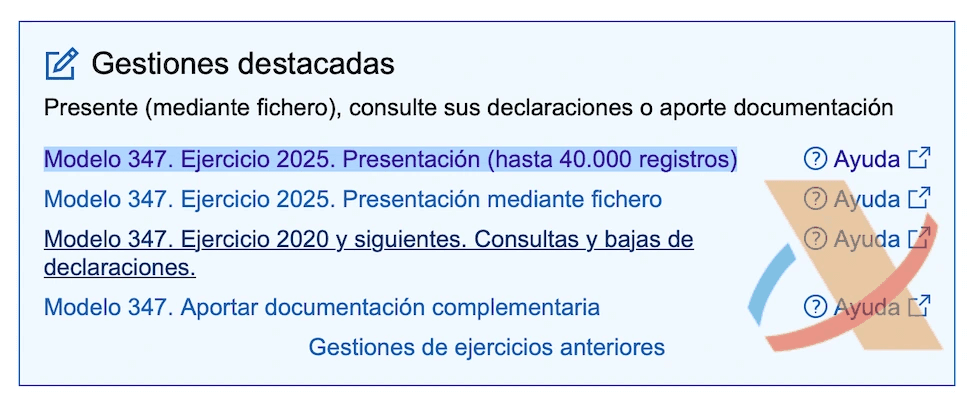
Select Modelo 347. Ejercicio 2025. Presentación (hasta 40.000 registros)
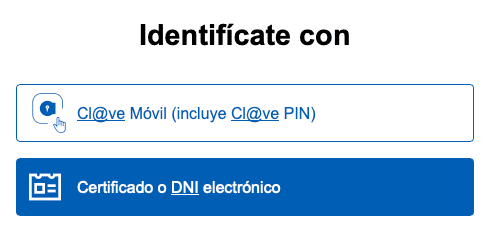
Sign in using any available method
The form page will open.
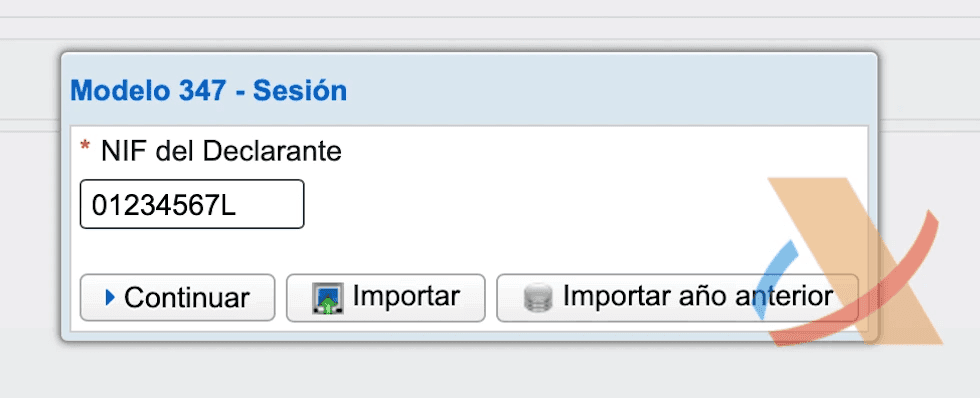
Enter your NIF/NIE and select the year you’re filing for.
Click Continuar.
Page 1: Applicant details
Fill in Apellidos y nombre and provide a phone number.
Leave NIF del representante empty.
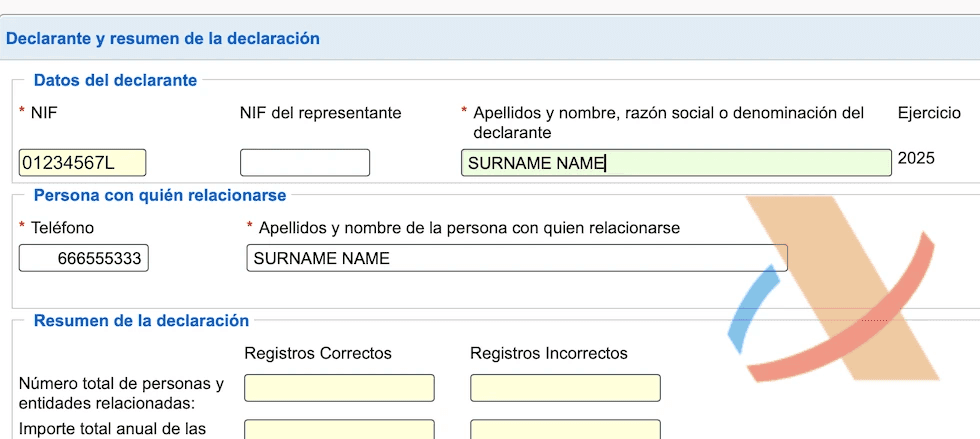
The Resumen de la declaración section will be filled in automatically.
Use the navigation menu to go to page 2.

Page 2: List of transactions
Add transactions for the reporting period.
There are several operation keys, but for most autónomos only two are relevant:
- A: Adquisiciones de bienes y servicios superiores a 3.005,06 euros
- B: Entregas de bienes y prestaciones de servicios superiores a 3.005,06 euros
Example table
| KEY | NIF | Name | Total | Q1 | Q2 | Q3 | Q4 |
|---|---|---|---|---|---|---|---|
| B | 000000000 | Emaar Properties PJSC | 7.200,00 | 4.000,00 | 2.000,00 | 1.200,00 | 0,00 |
| A | B65130643 | Apple Retail Spain, S.L.U. | 4.300,00 | 2.100,00 | 0,00 | 2.200,00 | 0,00 |
| B | P4625200C | Ayuntamiento de Valencia | 4.000,00 | 4.000,00 |
E: Subvenciones, auxilios y ayudas satisfechos por las Administraciones Públicas cualquiera que sea su importe.
This key is typically reported by the Administraciones Públicas themselves.
Purchases of goods and services: key “A”
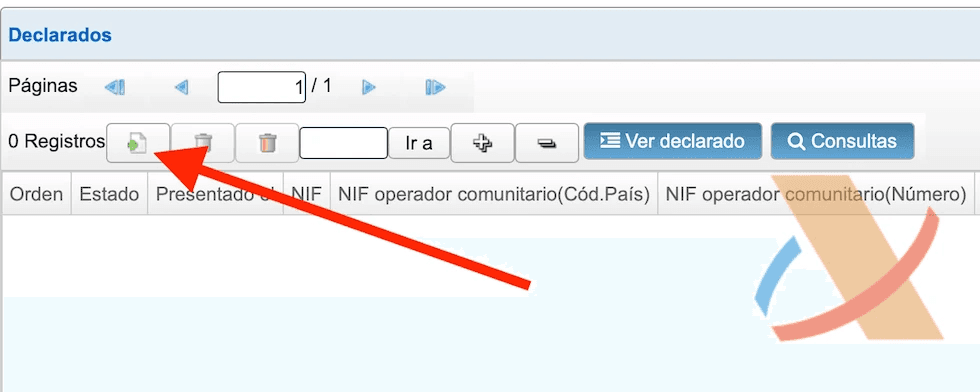
Click the file icon with the “plus” sign to add a new transaction, as shown below.
Add the purchase transactions for Apple.
- NIF declarado: the company’s tax ID
- Apellidos y nombre, razón socia: the company name
- Codigo Provincia: the company’s province
- Clave Operación: select key “A”
- Importe trimestal de las operaciones: enter the quarterly totals with this counterparty
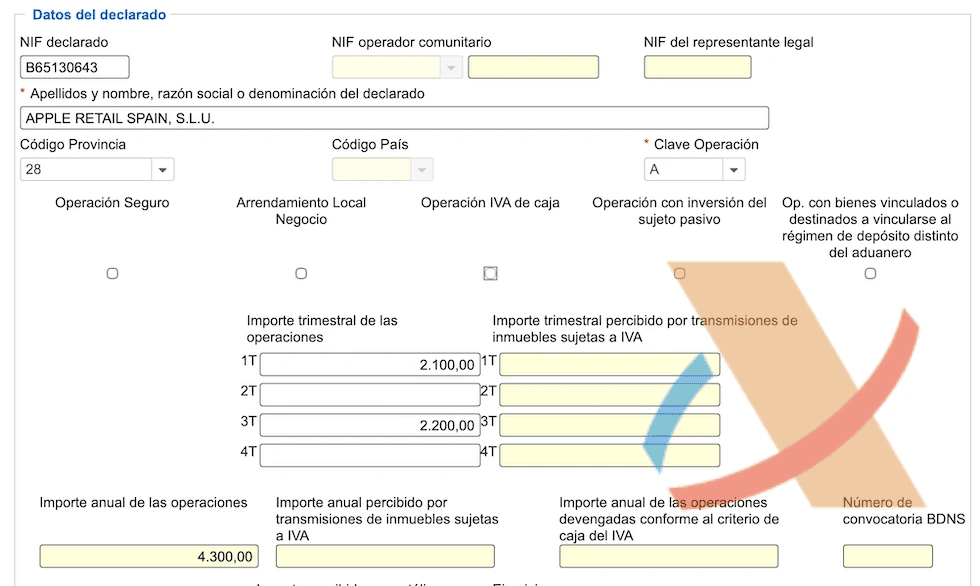
To save, click Ver lista de operaciones.
Sales of goods and services / services provided: key “B”
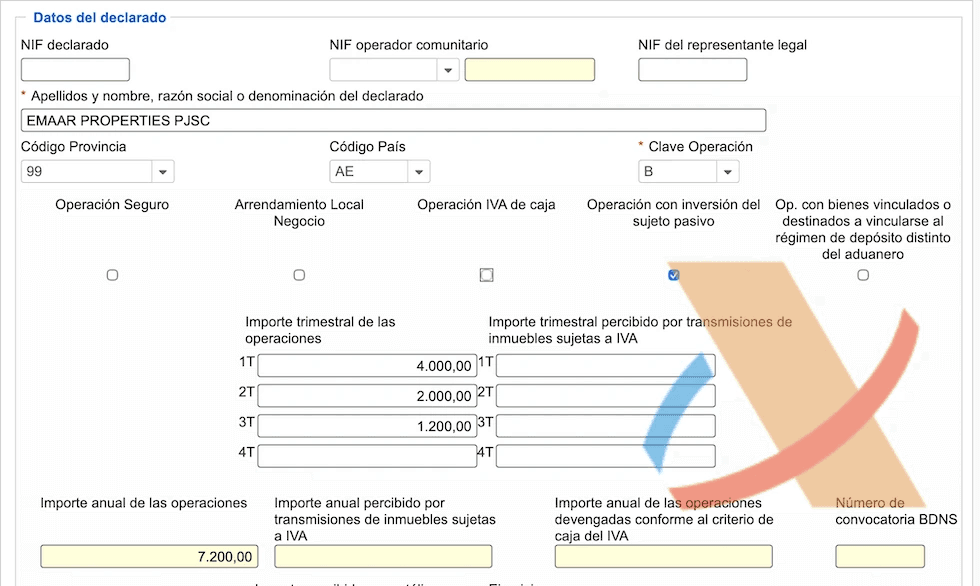
Add the transactions for services provided to the UAE company.
- NIF declarado: leave blank
- Apellidos y nombre, razón socia: company name
- Codigo Provincia: for companies outside Spain, select code 99 (at the end of the list)
- Clave Operación: select key “B”
- Operación con inversión del sujeto pasivo: check this box (reverse charge)
- Importe trimestal de las operaciones: enter the quarterly totals with this counterparty
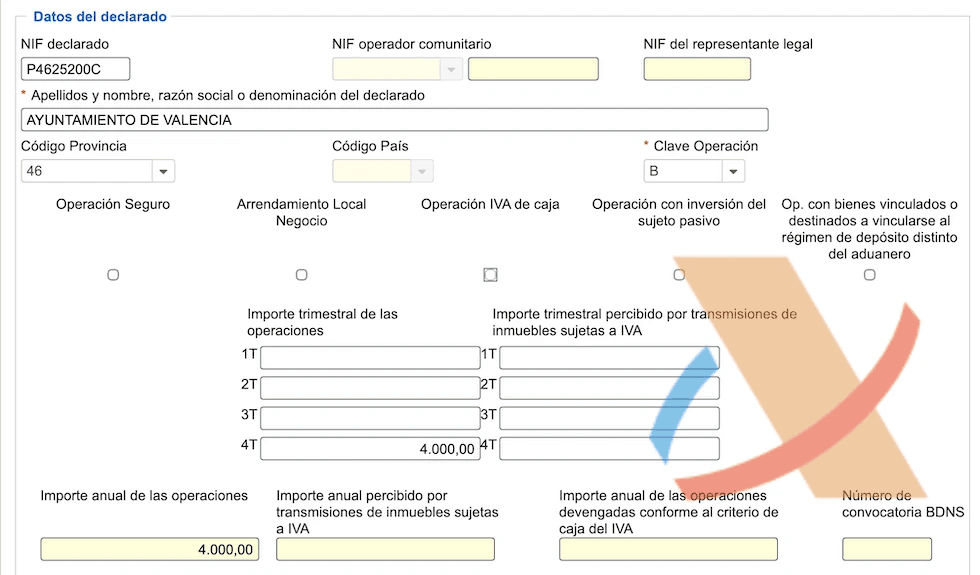
Add the grant received from the Ayuntamiento.
- NIF declarado: tax ID
- Apellidos y nombre, razón socia: organization name
- Codigo Provincia: province (Valencia)
- Clave Operación: select key “B”
- Importe trimestal de las operaciones: enter the grant amount in the quarter when the grant was awarded/recognized or when funds hit your bank account
Page 3: Inmuebles (real estate)
Not covered in this guide.
Review the result
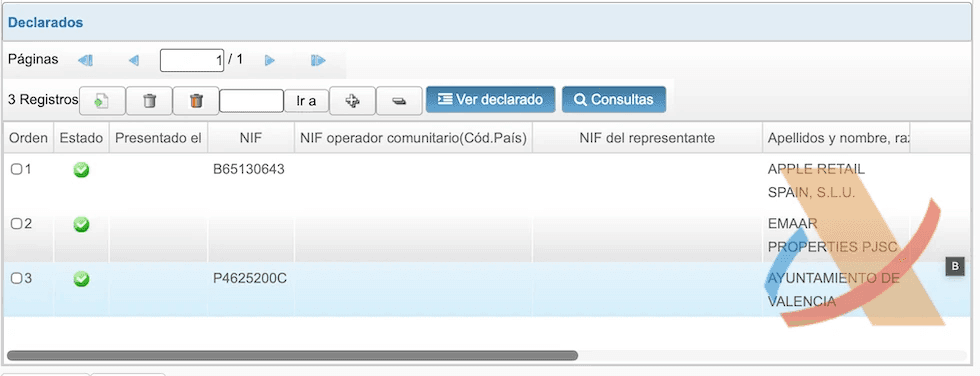
You should end up with a list like this.
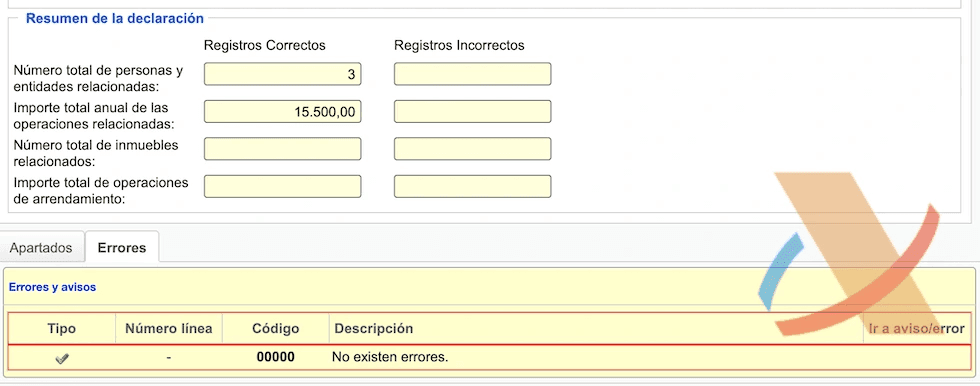
The Resumen de la declaración section on page 1 is filled in correctly.
Submit the completed return
Click Firmar y Enviar. If the system finds errors, they will be shown at the bottom of the page.
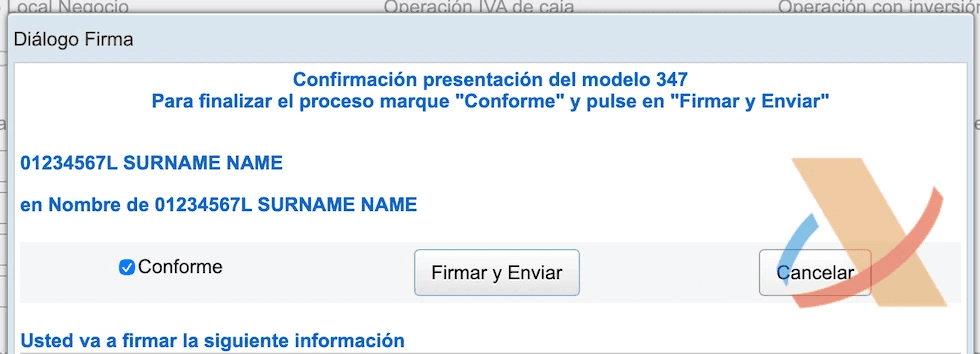
Check Confirme and click Firmar y Enviar again in the modal.
The next page will show the completed form.
Return filed!
⭐ How to fill out the quarterly VAT return (Modelo 303)
⭐ How to fill out the intra-EU transactions return (Modelo 349)
⭐ How to issue an invoice correctly
⭐ How to keep your accounting books as an autónomo
Questions or suggestions? Join the channel: Españevo: 🇪🇸 Autonomo, Taxes